
G2A.COM is a marketplace for digital products focused on gaming. G2A offers massive selection of games which customers can purchase, but it also offers the opportunity to sell those products. If you intend to start selling on G2A, then you want to know all G2A selling fees that you will encounter and how much will all that cost you.
On G2A.COM, customers can buy game keys for Steam, Origin, GOG, Uplay, Origin, Epic Game Store, Battle.net, Xbox One, PSN, etc. Aside from game keys, G2A also includes software, subscriptions, gift cards, etc.
Buyers have access to large catalog which is updated daily and in case of any issues they can always open support ticket or file G2A money-back guarantee claim.
If you want to start selling on G2A, I will help you predict the costs related to selling on the G2A marketplace. Be noted that you need to have registered business and valid tax number to sell on G2A. Without providing them documents about your business (company) there is no way to sell.
POPULAR GAME KEY MARKETPLACES
UPDATE: It seems that G2A started allowing private sellers to sell again. You can fill Individual Verification and sell as individual seller without the necessity of being a sole trader or owning a company. Once you pass that verification you are able to sell digital products on G2A Marketplace for turnover up to 1 000€ in total. What happens when you reach that turnover? I guess you are not able to sell anymore unless you register as business.
G2A Selling Fees And Commissions
G2A charges various fees on sold products. The fee for selling is 9.9% + €0.4 on every sold game key.
Be noted that in case of a refund G2A does not return fee. The customer will be refunded the whole amount from your balance.
Additionally, G2A also charges fees for creating offers, updating price and renewing product listings. For each price change, you will be charged 0.15€. Be careful as this accumulates very quickly. There is also the cost of adding items to an auction of 0.15€ for every 10 keys you add to sell for a particular product. Each game you start selling is another 0.15€.
Make sure that the prices of the products you are selling are higher than the fees you need to cover. Whenever a user buys a game key from you, your income is automatically assigned to your G2A balance. You can monitor your money flow through the Statements tab on your G2A dashboard.
If you want to see comparison of all fees from all marketplaces, then check my G2A vs Kinguin vs Gamivo vs Eneba comparison.
G2A Balance And VAT
For security reasons, when you sell key, earned money will first go to pending balance. After 14 days those funds go to the available balance and you are free to create payout or spend that money on G2A and partnered websites. The Processing Transfers tab shows you how long you will have to wait before the processed funds become available for use.
G2A also provides you with options for charging VAT. The Tax Rates Management feature on the G2A Account dashboard enables you to control and adjust the tax rates for any country of your choice. You can specify the tax rate prices which will be added and which customers from specified countries pay.
All countries have a default tax rate of 0% – until you define the custom rate for a specific country. This feature allows you to pass additional tax costs on the buyer. However, you are still obliged to settle the taxes yourself.
G2A Processing And Payout Fess
| Processing fees | Fixed |
| The cost of listing an auction | 0,15 EUR |
| The cost of updating the price | 0,15 EUR |
| The cost of adding items to an auction | 0,15 EUR/10 items |
| The cost of editing quantity (in preorder auctions) | 0,15 EUR |
PAYOUT FEES
There are fees for withdrawing your money depending on the payout method. So if you withdraw, for example, 2 000 EUR via Skrill, you will pay 20 EUR + 1 EUR in fees.
| Payout fees | % | Fixed |
| Bank Transfer | 1% | 1,50 € |
| Skrill | 1% | 1 € |
| WebMoney | 1% | 1 € |
| Payoneer | 1,5% | 1,5 € |
Be noted that you will also be charged currency exchange fee 2,49%. G2A allows buyers to pay in their country currency. But G2A only provides payouts in selected currencies (usually EUR and USD).
What Is The G2A Order Fee?
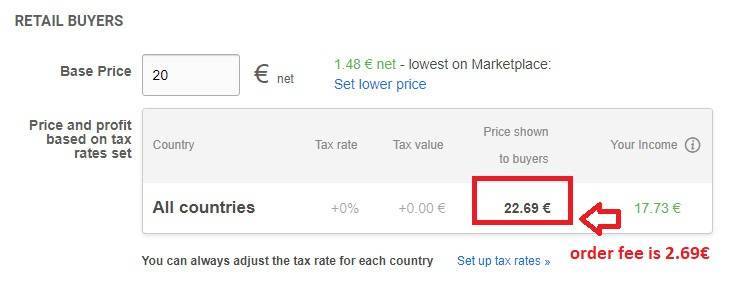
The order fee is a new addition from G2A. The buyer pays the order fee and nobody knows exactly what is included there (payment gateway fee, G2A shield maybe). But it has made prices on G2A significantly higher by default.
The order fee was previously added to the shopping cart or during checkout and was much lower than now. As a buyer, you were able to see what you are paying and how much. For example, you were able to see the amount paying for the game key, how much you are paying a fee for payment gateway and how much for G2A shield.
Now, all that is automatically included in the base price of products from the start. There is no doubt it was done intentionally to earn more as this could have been done differently.
Fees Fees Fees
Some would say G2A has fees on absolutely everything. And yes while your margin will quickly drain thanks to fees. Dont forget VAT.
On everything that you earn you will also need to pay tax depending on your country’s laws. So take that in mind when selling or increase the price more to cover it.
And that are just a fees involved in selling. Business daily operation costs and costs of managing company are something entirely else that will also need to be covered.
After seeing all this I bet you are thinking that in order to end in plus you need to find supplier which will provide you keys at extremely low prices. And you are right. But that is also not easy to find.
G2A Inactivity Fee
G2A charges 1 EUR inactivity fee. So have this in mind. This is nothing new when it comes to online accounts as many companies have that kind of fee. But it is the first time marketplace like this has it (as far as I know).
G2A charges an inactivity fee after someone has not logged into their G2A.COM account for 180 days. An email is sent 3 days before the charge to remind the user and allow them to log in and avoid the fee. The fee of 1€ is taken from the user’s G2A Wallet (if there are no funds on the Wallet, you will not be charged anything). Another 1€ will be taken each month that the user stays inactive.
If the user logs in, the timer resets itself and they have another 180 days before they are charged. If there are no funds left (or no funds to begin with) on their G2A Wallet, then the account is set to inactive. All a user needs to do to reactivate it is log back in.